

User login is often said to provide proof of the identity of the user. Is this always the case and is it necessary? If I register an account at a site with a fake name X and a chosen password Y, am I proving my identity? Of course not. In fact, the password only serves as a means for me to prove at a later stage that it was me who created the account with fake name X.
Proving your identity can only be done by means of credentials in their true meaning whereby a trusted party vouches for your identity, for example a public administration. And as long as this is not the case, I’m not proving my identity with the login button.
What does the login button (or user authentication in general) then do? User authentication is the mechanism to prove that you are present and that you created a previously registered account [1]. The proof may be provided by setting a password during registration and submitting the password later on.
But there are more convenient and more secure methods, namely by using a trusted device. Whereas in the past such device needed to be dongle or a chipcard, these days smartphones have a secure vault so you can configure them as a trusted device.
What is anonymous login?
Brands have to ask your consent with their privacy policy. Next to being specific, informed and freely given, the brand must obtain your consent explicitly and must enable you to withdraw your consent.
Today, when you are anonymously using a brand’s web services, you are considered a ‘visitor’. In line with GDPR, they may bother you each time you visit them with asking consent to a cookie policy. They will then assume that you are accepting their privacy policy and place yet another cookie.
With anonymous registration, the brand could suffice to ask your consent only once. The brand can then entice you to complete your profile at a later stage. The brand can also associate your visits and transactions with your anonymous account, assuming your consent allows it. If you do not agree, you can always review your account and withdraw your consent.
How does anonymous login work?
So, how does anonymous registration and authentication work? n-Auth (see below) offers a solution that works as follows, thereby implementing method-2 of our post on policy enforcement. You’ll have to install the brand’s login-app on your trusted device (e.g. your smartphone) and then:
- Open the login-app on your device
- Unlock your device’s vault using fingerprint, face-ID, or PIN
- Enter a nickname for the brand
- Read and accept the brand’s policy
The login app now interacts with the Policy Server and registers itself.
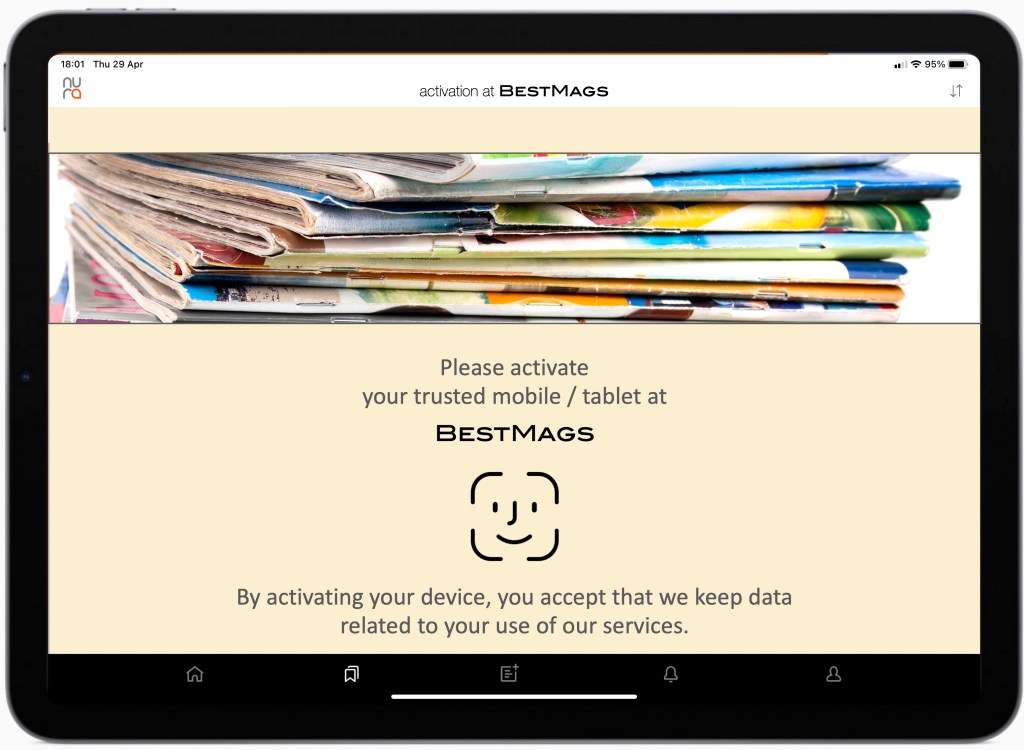
Your login-app is now activated and the brand registered the nickname and your consent. Almost no keyboard entry (except for a nickname) is needed: no passwords, no email address, no phone number. Even more: no email address to confirm, no password to re-enter, no captcha to figure out. Remember: it is not you who is registered but the app. Yet, with a security that surpasses any other mechanism in use today thanks to its cryptographic protocols. You are now identified with the keys on your mobile and its login-app. Note that ISO 24760 makes the same distinction between identifier (here: your mobile) and identity (your characteristics and properties), see [4].
Whenever you visit one of brand’s sites/apps/services through any browser, on any laptop, tablet, mobile or TV, the following happens:
- Their web server asks their Policy Server to check on you
- In case of uncertainty, and only then (see [2]):
- the Policy Server asks you to prove you are in control of the registered device
- you open the brand’s login-app on your trusted device
- you unlock your device’s vault using fingerprint, face-ID, or PIN
- the login app now interacts with the Policy Server and authenticates itself
- The Policy Server now confirms to the brand’s web server that you’re OK (see [3])
Step 2 is of course crucial: when is it necessary? The brand set ups its own policy. They can decide to only request authentication when you are using a different browser or different device. Or whenever you are executing a sensitive transaction. Or after 12 months. Or when your subscription expires.
Why is this approach useful for a brand?
First, as a brand you can now manage consents as you should. With a consent that you can retrieve and that the visitor could withdraw.
Does it add friction? Well, the visitor does need to download, install and activate the login-app. That’s true. But no passwords need to be supplied and no forms need to be completed.
Why would visitors appreciate this? If they realise you are not setting cookies, they are not required to complete a form and they realise you take their consent seriously, they’ll find it a good start. Later on they’ll appreciate your approach because they can also consume your content on devices that they borrow and even on devices where keyboard entry is painful, such as a TV screen. And they’ll never have to supply a password, ever. Even when they have decided to make a more complete registration (thereby reducing or giving up the anonymity in exchange for extra services).
How does n-Auth work?
For a full academic description of the n-Auth authentication model, you can download the paper.
Rather than entering a password into the browser or app that is then sent to the server, n-Auth lets the user authenticate simply to his trusted mobile.
Authentication is basically broken up in two disjoint steps:
- the user authenticates to his trusted mobile to prove he’s the owner and present
- the mobile n-Auth client authenticates itself to the server without exchanging passwords or long-term secrets.
This means that user authentication is out-of-band, i.e. using a different device and channel, and can happen anonymously. Given the security of the vault and the biometrics on mobile phones, security of n-Auth authentication is superior to traditional methods. The only downside of this model is that the n-Auth client must be installed on the trusted mobile and be registered at the server beforehand (see above).
The authentication of the n-Auth client to the server adopts a SIGMA cryptographic protocol (“SIGn-and-MAc”). The SIGMA family of key-exchange protocols offer perfect forward secrecy which means that session keys remain protected even in case the long-term secrets used for the key exchange are compromised. To ensure secrecy of the mobile client as well as mutual authentication between the mobile client and the server, these protocols adopt Diffie-Hellman and add a secure hash and signature. As such, SIGMA protocols establish a trusted channel between the mobile client and the authentication server.
User authentication using n-Auth can happen in combination with a Policy Server. In this example architecture, the Policy Server (as described in our post on How to implement policy enforcement) performs access control and enforces user authentication before accessing restricted content.
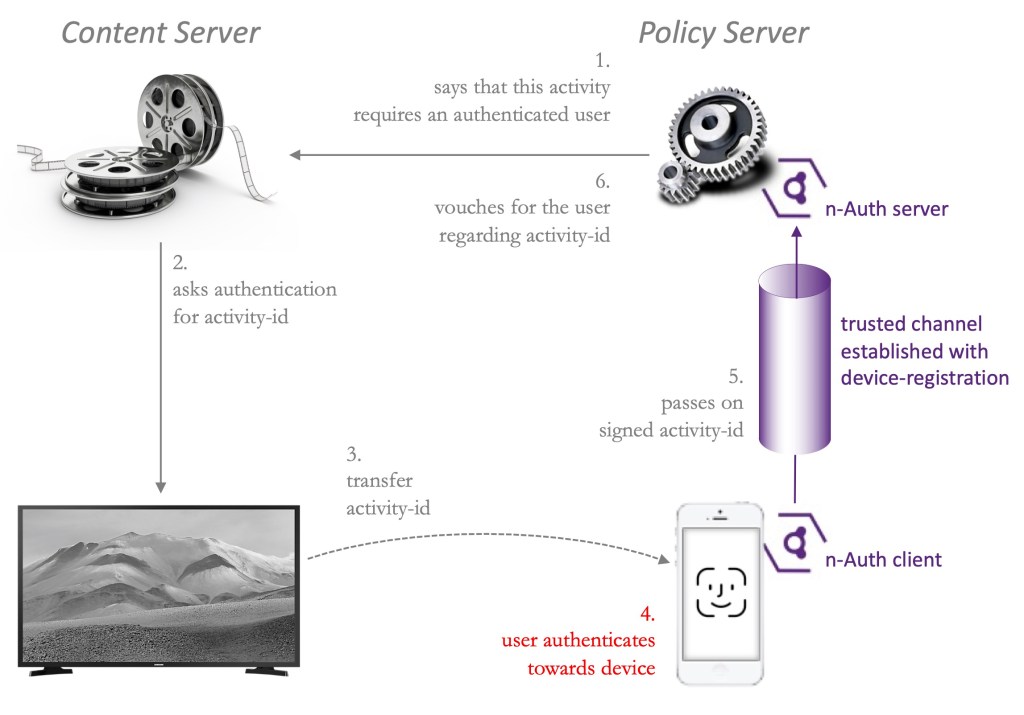
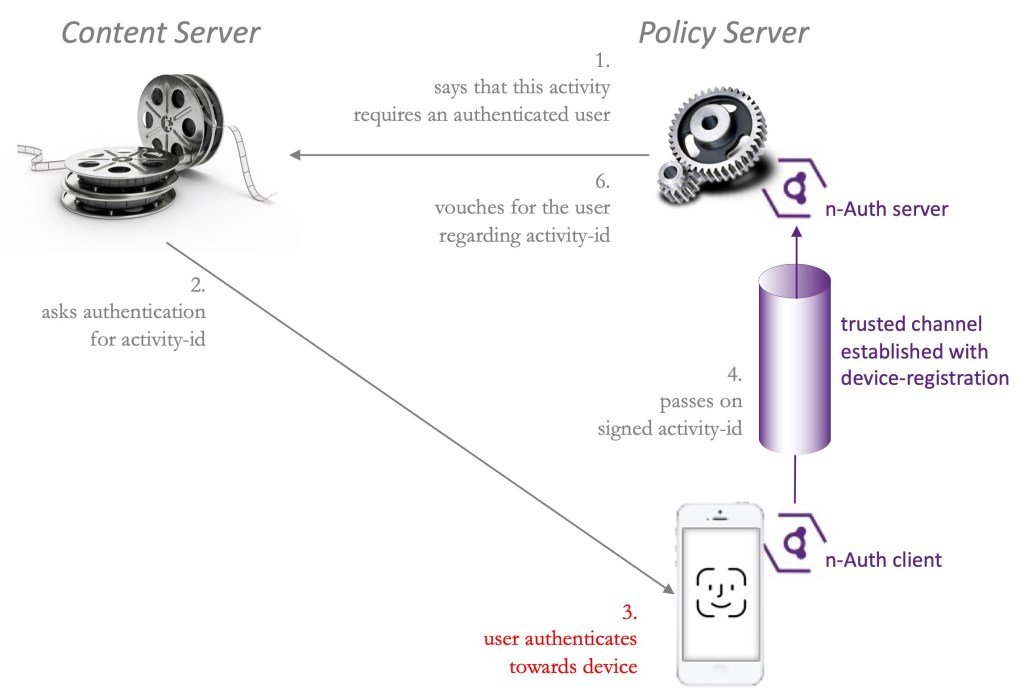
- When a user logs in, accesses restricted content or executes an access-controlled function (the ‘activity’) from a browser or app on a computer, tablet, smartphone, TV or game console, the policy server will state to the content server that user authentication is required.
- The content server will initiate a request to the user to authenticate himself with regards to the activity he wanted, identified with an activity-id. The browser or app may display a QR code for that matter.
- The user now takes his trusted device (e.g. his smartphone) with the n-Auth client installed and registered. The activity-id is exchanged between the browsing device and the n-Auth client using bluetooth, NFC, scanning a QR code or entering it manually on the smartphone.
- The user then authenticates to his trusted device using the mechanism he is used to, e.g. face-id, fingerprint or PIN code. This unlocks the smartphone’s private vault to the n-Auth client.
- The n-Auth client uses the secrets of the private vault, opens the trusted channel. It then executes the n-Auth protocol with which the activity-id is signed and passed on to the n-Auth server.
- The n-Auth server (installed at the policy server) now formally declares that the user is authenticated and that the content server can honour the user’s request. Note that additional conditions may need to be met, as described in [3].
Notes
[1] Strictly speaking, “authentication” is a broader topic than described here. Firstly, authentication not only applies to users but also applies to devices, systems and apps. Secondly, authentication in its broadest sense provides proof of authenticity and thus “what you see is what it is.” In reality, such proof exists by associating “what it is” with credentials that are issued by someone you trust and that cannot be forged. As defined by ISO 24760, such identity proofing verifies the attributes (characteristics or property) of an entity against an authority. Web user authentication, however, is simply asking them to prove they registered an account and thus remote from identity proofing.
[2] How does the brand’s web server know who to check on? Different mechanisms exist. One is simply to ask your nickname. Alternatively, for example in a browser or on a TV, it can show a QR code that you scan with the login-app. Or your trusted device may have been paired with your laptop or TV and exchange this autonomously using bluetooth or NFC. When you are using a tablet or mobile, the device itself may supply this.
[3] This scenario uses a simple policy whereby the only requirement for the brand’s web server is that you have registered your consent. Of course, the Policy Server may execute more complex rules before deciding to grant you access – see our post on policy-based authorisation.
[4] ISO 24760-1 IT Security and Privacy — A framework for identity management, speaks of “identity” as a set of attributes (characteristics or property) related to an entity, which is to be distinguished from “identifier” that is an (often specifically created) attribute to uniquely characterise an entity in a domain. A club-membership number together with the club’s name, a health insurance card number together with the insurer’s name, an email address, or a Universal Unique Identifier in a CIAM can all be used as identifiers. The domain is origin of the identifier, for example the club, the health insurer, the email server or the CIAM. In this post, the domain is the brand that operates the login-app.
 Controlled AI services